Your redirects are part of your product, so monitor them跳转也是产品的一部分,请监控它
A normal uptime check follows redirects and reports 200, so a forgotten or broken redirect goes unnoticed. How redirects get lost in migrations and deploys, and how to check the redirect itself.普通的可用性检查会跟随跳转并报告 200,所以被遗忘或弄坏的跳转没人会发现。跳转是怎么在迁移和部署中丢掉的,以及怎么检查跳转本身。
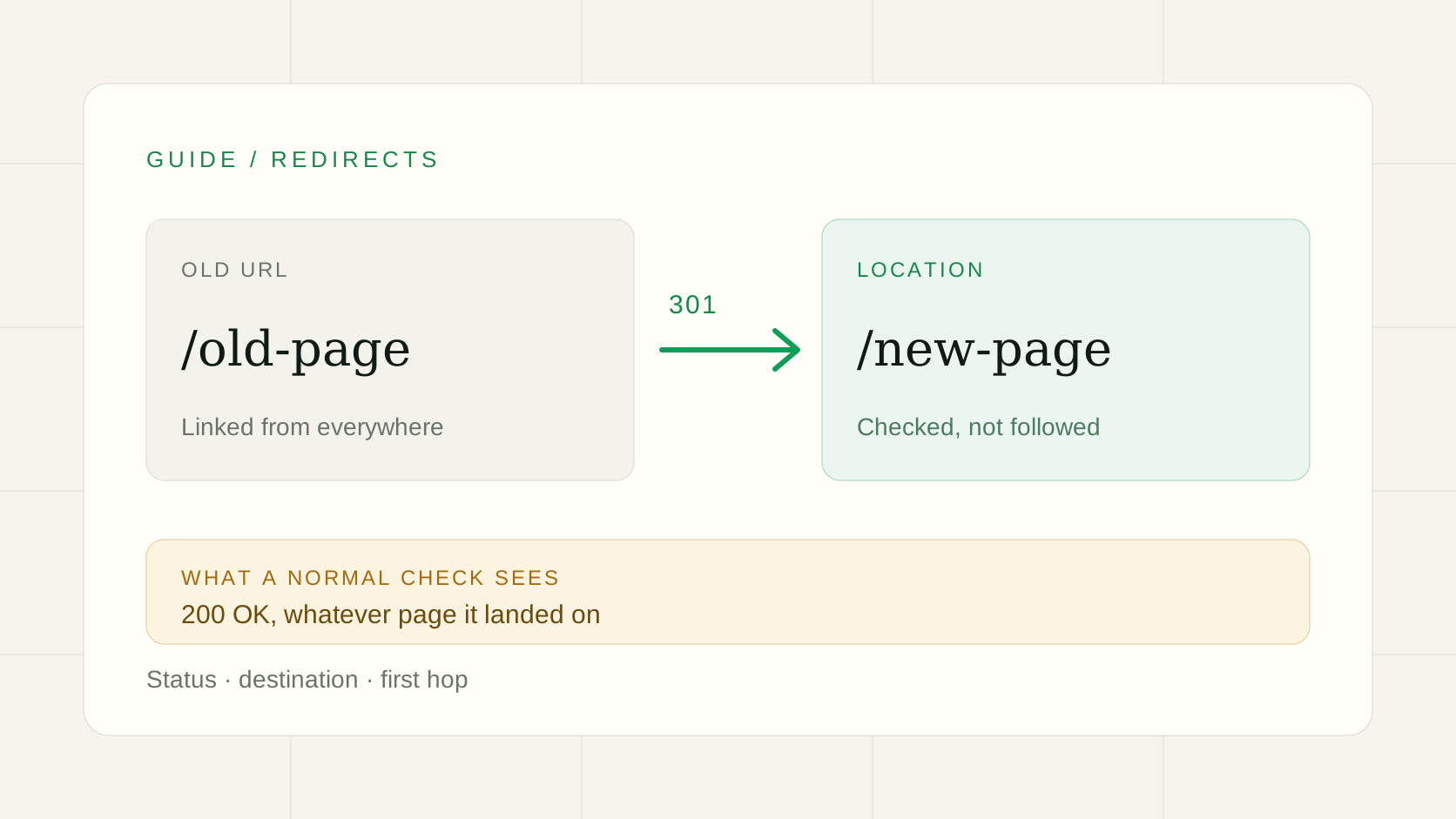
You moved the site. The new one is up, the dashboard is green, you went to get a coffee. Two weeks later someone tells you that every old link in your newsletter, your docs and a few hundred forum posts now says "page not found".网站搬完了,新站正常,监控一片绿,你去泡了杯咖啡。两周后有人告诉你:你发过的邮件、文档,还有论坛里几百个帖子里的老链接,现在全是"页面不存在"。
Nothing was down. Nothing was even slow. The redirects were just gone, and nobody was watching them. I want to talk about why that happens so easily and what to do about it.没有任何东西宕机,连变慢都没有。只是跳转没了,而没有人盯着它。这篇想聊聊为什么这种事这么容易发生,以及怎么防。
Green dashboards are very good at missing this绿色的面板,特别擅长漏掉这种事
Most uptime monitors, ours included until recently, do the obvious thing: request the URL, follow any redirect, and judge the page at the end. That is the right default for "is my site up". It is the wrong tool for "does my old address still lead to the right place", for two reasons.大多数可用性监控(我们自己直到不久前也是)做的是最直观的事:请求这个地址,跟着跳转走,最后判断落地的那个页面。回答"网站是不是活着",这是对的默认行为;回答"旧地址还能不能通到对的地方",它就不合适了,原因有两个。
- The redirect is gone, but you only watch the new URL. Your monitor points at the new address, which works. The old one now returns 404 and no check ever visits it.跳转没了,可你只盯着新地址。监控指向新地址,它当然正常。旧地址已经返回 404,却没有任何检查会去访问它。
- The redirect leads somewhere, just the wrong place. The old URL now sends everyone to the homepage, a login page or a parking page. It loads fine, so a monitor that follows redirects says 200 and moves on. Google calls the homepage case out specifically: sending many old URLs to one unrelated page can be treated as a soft 404.跳转通了,但通到了错的地方。旧地址现在把所有人送到首页、登录页或者域名停放页。页面能打开,跟随跳转的监控就报 200,然后什么都不会发生。Google 专门提到过首页这种情况:把很多旧地址都指向一个不相关的页面,可能会被当成软 404。
How redirects actually get lost跳转到底是怎么丢的
It is almost never one dramatic mistake. It is a small, reasonable change that nobody connected to the redirect.几乎从来不是一次惊天动地的失误,而是某次合情合理的小改动,没人把它和跳转联系起来。
- The migration. The redirect rules lived on the old server, or in the old CMS, or in a plugin. The new stack does not have them, and the old one gets switched off a month later to save money.迁移。跳转规则原本在旧服务器、旧 CMS,或者某个插件里。新环境里没有,而旧的一个月后为了省钱被关掉了。
- The deploy. A framework upgrade changes how trailing slashes work. Someone rewrites the proxy config and the redirect block does not survive. A rule lives in a dashboard setting that a deploy quietly replaces with the version in git.部署。框架升级后,结尾斜杠的处理变了。有人重写了代理配置,跳转那一段没保留下来。某条规则存在控制台的设置里,一次部署悄悄把它换成了仓库里的版本。
- 301 quietly becomes 302. Both "work" in a browser. Google treats them differently, though: a permanent redirect makes the target the canonical address, a temporary one keeps the old URL in search results.301 悄悄变成了 302。在浏览器里两者看起来都"能用",但 Google 的处理不一样:永久跳转会让目标地址成为规范地址,临时跳转则会让旧地址继续留在搜索结果里。
- http to https, www to the bare domain. Set up once years ago, nobody remembers where. A certificate renewal or a CDN change is enough to break it.http 跳 https,www 跳裸域名。好几年前配过一次,没人记得配在哪。一次证书续期或者 CDN 调整就可能把它弄坏。
- Short links and campaign URLs. Printed on a flyer or buried in a video description. They cannot be changed, so when they break you are stuck.短链和活动链接。印在传单上,或者藏在视频简介里,改不了,坏了就只能干瞪眼。
A small one of my own我自己踩过的一个小坑
This week I was adding exactly this feature, and I deployed the checker to the wrong project on our hosting. The deploy said success. Nothing errored. I then ran a test monitor that expected a 301, and it came back with "Expected 301, got 200". The old code was still running there, and it followed the redirect like it always had.这周我在做的正是这个功能,结果把检测程序部署到了托管平台上错误的项目里。部署显示成功,没有任何报错。随后我跑了一个期望 301 的测试监控,返回的是"Expected 301, got 200"。那里跑的还是旧代码,照旧跟随了跳转。
The deploy "worked" and the behaviour was still wrong, and a redirect check was what made it visible. I would not have noticed from the status page of the deploy.部署"成功"了,行为却是错的,让它现形的恰好是一个跳转检查。光看部署的成功页面,我不会发现。
What to check该检查什么
In OpenUptime, create an HTTP monitor for the old address and pick 301 (or whichever status you serve) as the expected status. The redirect is then checked and not followed. Optionally fill in where it must lead, as a full URL or a path. If the Location differs, the check fails and the error shows both what it got and what it expected.在 OpenUptime 里,为旧地址新建一个 HTTP 监控,期望状态码选 301(或者你实际返回的那个)。这样检查的就是跳转本身,而不会跟随。还可以填写它必须指向哪里,完整 URL 或路径都行。Location 不一致时检测失败,错误信息会同时写出实际值和期望值。
Setting it up, step by step一步一步设置
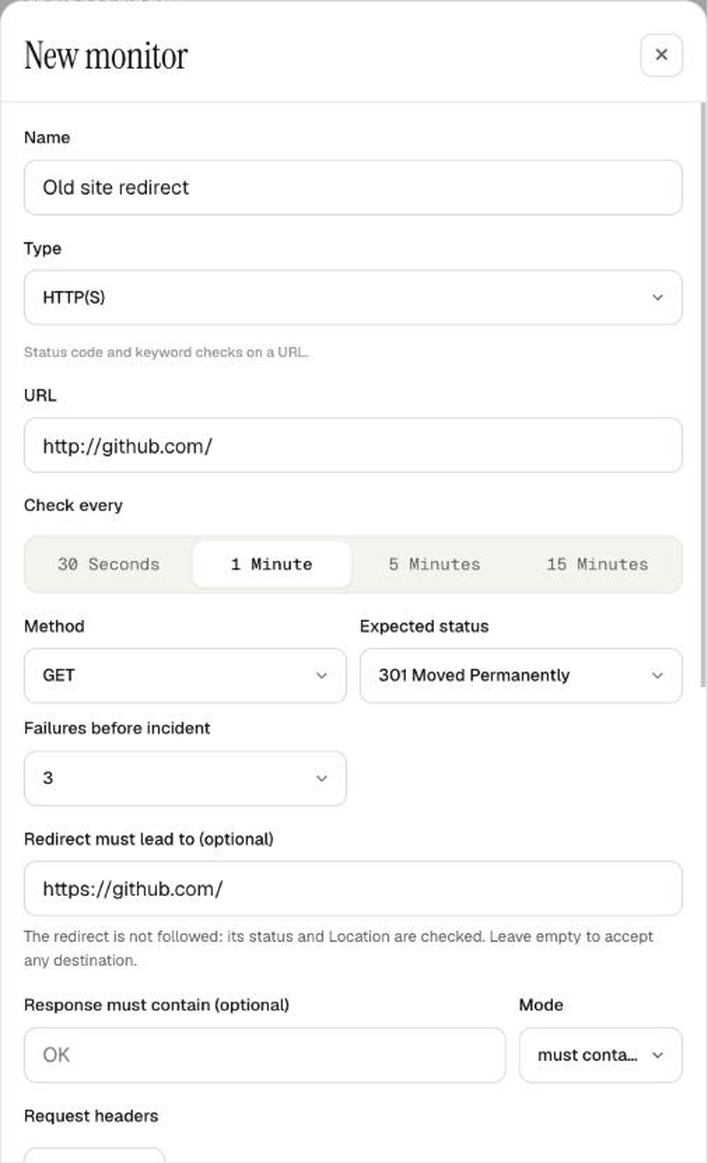
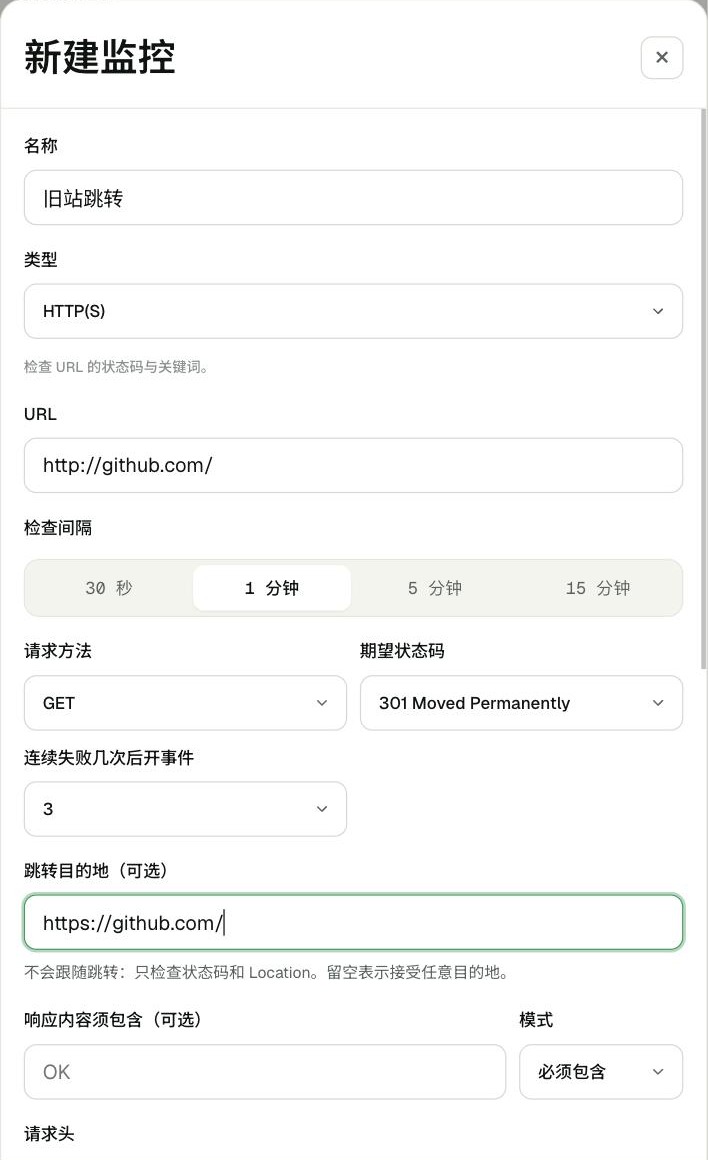
- Open the dashboard and go to Monitors, then click + New monitor.打开后台,进入监控页,点击+ 新建监控。
- Give it a name you will recognise at 3am, such as "Old site redirect". Leave the type on HTTP(S).起一个半夜被叫醒也认得出的名字,比如"旧站跳转"。类型保持 HTTP(S)。
- Put the old address in the URL field, the one people still visit, not the new one.URL 里填旧地址,也就是人们仍在访问的那个,而不是新地址。
- Under Expected status, pick 301 Moved Permanently, or 302, 307 or 308 if that is what you serve. A new field, Redirect must lead to, appears.在期望状态码里选 301 Moved Permanently;如果你实际返回的是 302、307 或 308,就选对应的。下面会出现一个新字段:跳转目的地。
- Fill in Redirect must lead to with the full new URL (a path also works). Leave it empty if you only care that a redirect happens.在跳转目的地里填完整的新地址(只写路径也行)。如果你只关心"有没有跳转",留空即可。
- Click Create monitor, then Check now on the monitor page to run the first check right away.点击创建监控,再到监控详情页点立即检查,马上跑第一次检查。
A short list that covers most of the pain:下面这份短清单,能覆盖大部分麻烦:
- the old domain's root, if you ever moved domains;旧域名的根地址(如果你搬过域名);
http://tohttps://, andwwwto the bare domain (or the other way round);http://到https://,以及www到裸域名(或者反过来);- the handful of old URLs that still get the most traffic or backlinks;还在带来最多流量或外链的那几个旧地址;
- any short link you have printed or published somewhere you cannot edit.任何已经印出来或发布到你改不了的地方的短链。
Keep the monitors for a long time. Google suggests keeping redirects for at least a year after a move, and says that from a visitor's point of view they can stay indefinitely. A redirect is cheap to keep and expensive to lose.这些监控请留得久一点。Google 建议搬迁后至少保留跳转一年,并且从访客的角度看,可以一直保留。保留一条跳转很便宜,丢掉它很贵。
What it does not do它做不到的
- It checks the first hop only. A chain of three redirects is not walked. Point old URLs straight at the final address.只检查第一跳,不会沿着三层跳转走下去。请让旧地址直接指向最终地址。
- It does not look at the page the redirect leads to. Keep a normal monitor on the destination as well, so you hear about it if the new page itself breaks.它不看跳转落地的那个页面。目的地上也请保留一个普通监控,这样新页面本身出问题时你也会知道。
- It is not an SEO audit. It tells you that the redirect you rely on still exists and still points where you meant. That is a narrow job, and it is the one that was missing.它不是 SEO 审计工具。它只告诉你:你依赖的那条跳转还在,而且还指向你想要的地方。这个活儿很窄,但正是之前缺的那一块。
If you are about to migrate something, add the redirect monitors before you start, not after. They are the cheapest way I know to find out you forgot something while it is still easy to fix. The details are in the API docs, and if you want a second pair of eyes on your setup, I am on X as @becool_me.如果你马上要迁移什么东西,请在动手之前就建好跳转监控,而不是之后。在问题还容易修的时候发现自己漏了什么,这是我所知道最便宜的办法。细节在 API 文档里;想让我帮你看看你的配置,可以在 X 上找我:@becool_me。
References参考资料
- Site moves with URL changes · Google Search Central
- Redirects and Google Search · Google Search Central
Common questions常见问题
- Why does my normal monitor not notice a broken redirect?为什么普通监控发现不了坏掉的跳转?
- A normal HTTP monitor follows redirects and judges the page it lands on. If the redirect sends people to a working page, even the wrong one, it reports 200 and stays green.普通的 HTTP 监控会跟随跳转,只判断最终落地的页面。只要跳转把人送到一个能打开的页面,哪怕是错的,它也会报 200,保持绿色。
- Does OpenUptime follow the redirect when I expect a 301?期望 301 时,OpenUptime 会跟随跳转吗?
- No. With 301, 302, 303, 307 or 308 expected, the redirect itself is checked and not followed. If you set a destination, the Location header must match it, otherwise the check fails and shows both addresses.不会。期望 301、302、303、307 或 308 时,检查的是跳转本身,不会跟随。如果填了目的地,Location 必须与之一致,否则检测失败,并同时显示实际值和期望值。
- How many redirect hops does it check?会检查几跳?
- Only the first one. A chain of redirects is not walked, so keep chains short and point old URLs straight at the final address.只检查第一跳,不会沿着跳转链一路走下去。所以请让跳转链保持简短,让旧地址直接指向最终地址。